Payment Links: Get paid from anywhere with a simple link

Want to accept a payment when you’re not face-to-face with a customer? Just create a Payment Link * through the Tyro Portal and share it with your customer. It’s a fast, secure way to collect a payment, wherever you are.

Log in
Merchant Groups and some Merchant types (MCCs) are not eligible for Payment Links *. Click here to learn more.
How to hire an EFTPOS terminal
So simple

Create a link and track the payment all from the Tyro Portal.

Get paid from anywhere

Wherever you are and whatever the time, you can request and accept payments.

No set up required

Bendigo Bank customers can easily access Payment Links via the Tyro Portal.

Fast payments

Request and accept a payment in just a few clicks.

Give your customers another way to pay

Be more flexible in how you request and accept payments.
To create a Payment Link & then share it with your customer, click the button to log in to the Tyro Portal.

  • Built in tracking and reporting

    See when links have been paid by your customers or if you need to follow up.

  • No set up needed

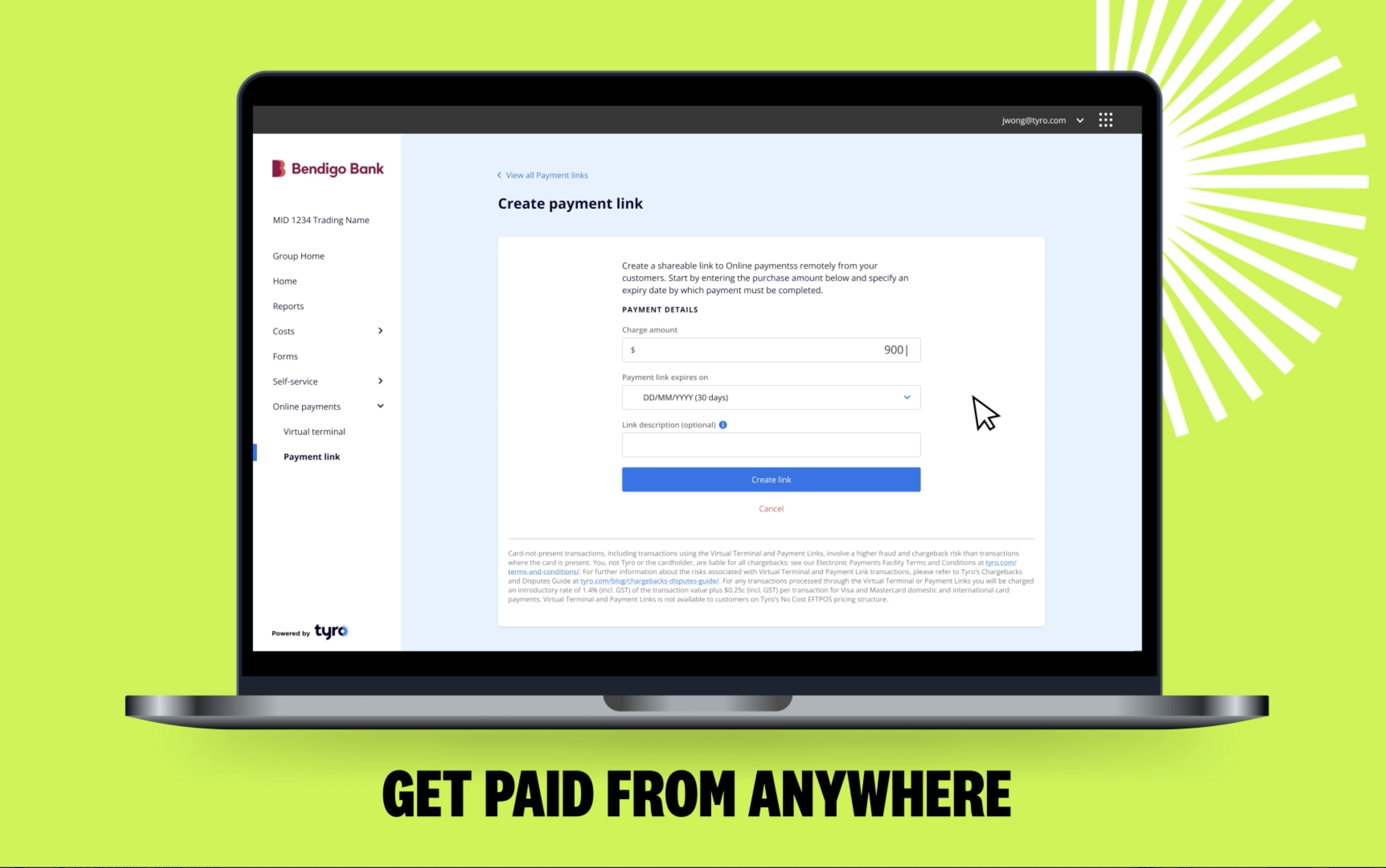
    Create a Payment Link * in seconds. Just add a description, the price and an expiry date.

  • Many ways to share

    Share Payment Links with your customers via email, text, or on messaging platforms.

Accept these payment types

How it works

Bendigo Bank powered by Tyro customers can access Payment Links * through the Tyro Merchant Portal.

Step 1
Log in to the Portal

Go to Online Payments, then Payment Links.

Step 2
Create a link

Add the amount and description and then click ‘create link’.

Step 3
Send your link

Share the link with your customer who can then pay you via a secure checkout.


Transaction fee

 
1.4%

(Per transaction including GST including premium and international cards)

Completed a job?

If you’re a tradie (or any service provider) and you’ve left your job for the day, just send a customer a Payment Link so you can get paid fast.

Taking a deposit?

Want to take a deposit from a customer before their booking, or stay? Send a Payment Link and get paid, before they arrive.

No online store, no worries

When a customer wants to purchase or reserve an item remotely and you don’t have an online store, send a Payment Link and allow them to pay securely from wherever they are.

Payment Links – Get Paid from Anywhere

Frequently Asked Questions

  • What are Payment Links?

    Payment Links allow Bendigo Bank customers to create a link for a one-off payment through the Tyro Portal. The link allows a customer to make the payment online through a simple check out experience.

  • How do you sign up for Payment Links?

    Bendigo Bank customers have access to Payments Links via the Portal. There is no additional set up required. If you’re not yet a Tyro customer, you can sign up here.

  • How do I access Payment Links?

    To access Payment Links, log into the Tyro Portal and click on ‘Payment Links’ under ‘Online Payments’ in the navigation bar on the left of your screen.

  • Am I eligible to use Payment Links?

    Payment Links is available to most Bendigo Bank powered by Tyro customers. Merchant Groups and some business types (MCCs) may be excluded from card-not-present transactions using Payment Links, please see the link for the full list of exclusions.

  • How can I share a Payment Link with a customer?

    You can share a payment link with customers online via SMS, email and messaging services.

  • Are there any additional fees when I use Payment Links?

    Payment Link transactions come with a 1.40% (incl GST) fee regardless of card type including international cards.

  • What payment types are available with Payment Links?

    Payment types available with Payment Links include Visa and Mastercard.

  • How many customers can pay on a single link?

    Each Payment Link can only accept a single payment from one customer.

  • Can I use Payment Links without having an EFTPOS or eCommerce solution with Tyro?

    Only Bendigo Bank EFTPOS and eCommerce customers have access to Payment Links.

  • Which user role has access to Payment Links and Virtual Terminal?

    Manager & Account Finance Manager user roles have access to Payment Links (excluding refunds). System Admin has full access. To set up another Admin call Tyro on 1300 00 8976