
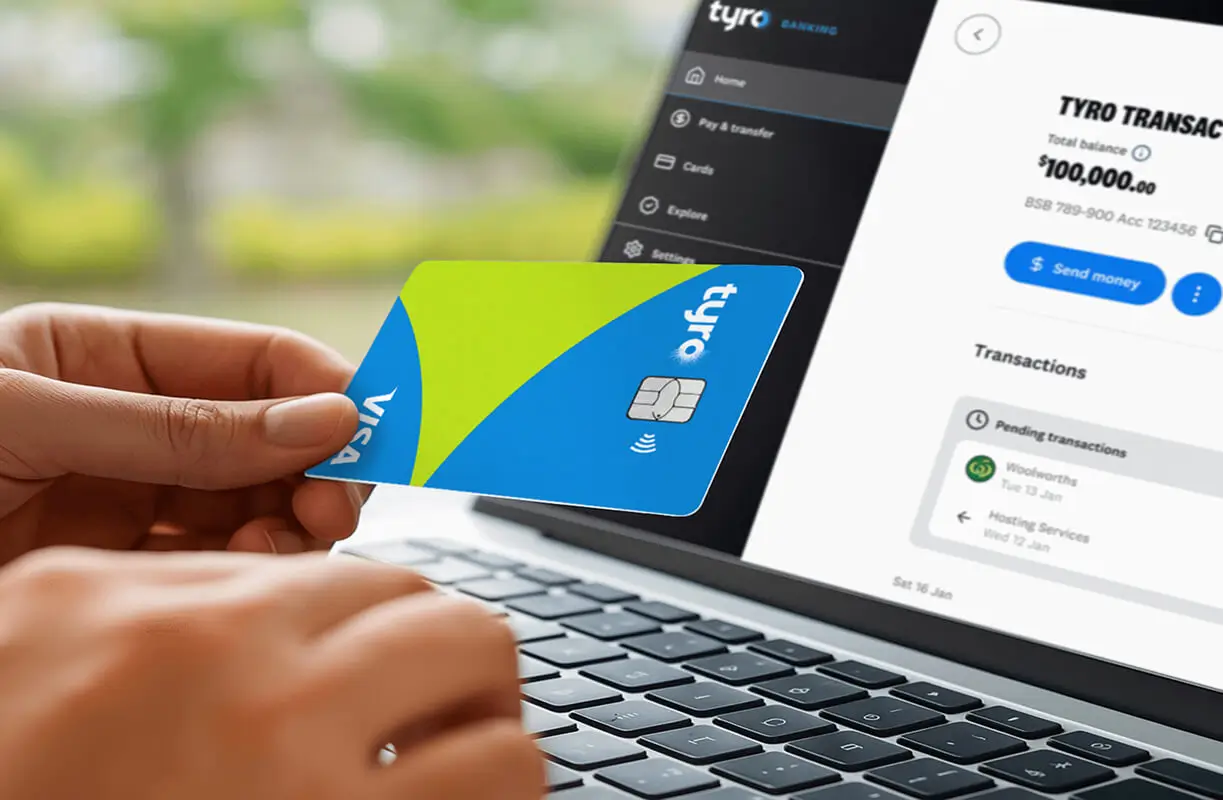
Welcome to Your New Tyro Banking Experience
Introduction
This page covers what you can expect before, during and after your move to Tyro’s new Banking experience. You’ll find answers to common questions about things like payments, cards, apps, account access and what’s changing once your move is complete.
Benefits you can look forward to:

More ways to pay
Choose from PayID®, PayTo®, and Osko® for instant transfers, BPAY®, bank transfer or Visa debit card to cover business expenses securely

Multiple accounts
Create multiple accounts to manage cash flow, track spending, and allocate funds for different purposes

Same day access to funds
Same-day settlement of your Tyro EFTPOS takings to your Tyro Transaction Account, 7 days a week, including public holidays 1

No account fees
$0 setup and account keeping fees, with no minimum balance
Preparing for the Banking Upgrade
What products are being migrated?
All Tyro Bank Accounts and Tyro Business Loans will be automatically migrated to Tyro’s new banking platform, along with existing payees, scheduled and reoccurring payments created on the account.
Can I opt out of the migration?
The migration is not optional. This upgrade is part of our ongoing commitment to providing Australian merchants with a reliable, scalable, and future-ready payments and banking experience.
Will my account balance transfer automatically?
Yes. Any funds held in your Tyro Bank Account at the time of migration will automatically move with your account to the new platform.
Will the migration interrupt my use of Tyro Banking?
Your access to Tyro Banking will be unavailable for a short time while we migrate your accounts to our new Banking offering. We expect this will last for around 12 hours (Scheduled Downtime). We will let you know when to expect this at the same time we confirm your Migration Date.
During your Scheduled Downtime, access to the Tyro App will be suspended, but you can continue to view your balance, takings and reporting in the Tyro Portal.
The following services will also be suspended:
- you will be unable to transfer funds, or make payments from your Tyro Bank Account;
- scheduled payments will not be processed (see more under the heading ‘How will the migration affect my ability to make and receive payments, including scheduled payments?’); and
- Tyro Business Loan repayments will be paused and will resume after the Scheduled Downtime.
Will the migration interrupt my use of other Tyro services?
You will still be able to use your EFTPOS or eCommerce facility, and manage and view your facility using the Tyro Portal. However, during your Scheduled Downtime:
- you will not be able to use the Tyro App; and
- you will not be able to update your business details.
How will the migration affect my ability to make and receive payments, including scheduled payments?
Prior to your migration Scheduled Downtime, any payment instructions you give us will be processed normally.
During the Scheduled Downtime, you will be unable to transfer funds or make payments from your accounts. Scheduled payments that are due to be paid during the Scheduled Downtime will not be processed. This includes any payment requests received via Xero®.
If there is a scheduled payment due to be paid during the Scheduled Downtime, it is recommended that you make a one-off payment in lieu of the scheduled payment, either before or after the Scheduled Downtime.
Once your Scheduled Downtime ends, incoming funds and direct debits will be processed to your account, and scheduled payments will resume.
How is my Tyro Business Loan impacted?
If you have a Tyro Business Loan, after migration, it will be called a Tyro Flexi Loan. Your account BSB number will change to 702-061, but your loan account number will stay the same.
There will be no changes to how your Tyro Business Loan operates, including no changes to your repayments.
What if I repay my Tyro Business Loan before the migration?
If you repay your Tyro Business Loan before the Migration Date, your loan account will be closed and will not be migrated.
What if I accept a new Tyro Business Loan before migration?
If you do not currently have a Tyro Business Loan but accept a loan before migration, your Tyro Business Loan will be migrated to our new platform. After migration, it will be called a Tyro Flexi Loan.
How will migration impact my loan repayments?
During your Scheduled Downtime, your Tyro Business Loan repayments will be paused. You may wish to make a manual repayment prior to the Scheduled Downtime. Once migration is complete, your loan will be named ‘Tyro Flexi Loan’ and the repayments will resume. There will be no changes to how your Tyro Business Loan operates, including no changes to your repayments.
Will I be able to access historical statements?
Historical account statements for your Tyro Bank Account will be available in our new Banking Portal and Tyro Bank App.
Transitioning Your Account
What will my account be called?
Your Tyro Bank Account will be called a Tyro Transaction Account.
Your Tyro Business Loan will be called a Tyro Flexi Loan.
Will my BSB and account number change?
Your Tyro Transaction Account will have a new BSB number (BSB 702-061). The account number of your Tyro Transaction Account will remain the same as it was before migration.
You will need to ensure that anyone paying funds into your account, or debiting your account under a direct debit arrangement, has your updated bank account details.
Please note that this BSB will appear to be registered to Indue Ltd (a division of Cuscal Ltd) in account details search, as Tyro utilises Indue Ltd for account-to-account payment services, including the BSB code used to receive payments.
Why does my BSB show up as registered to Indue Ltd or Cuscal Ltd?
Tyro utilises Indue Ltd for account-to-account payment services, including the BSB code that is used with your account number to receive payments. Indue Ltd is an Authorised Deposit-Taking Institution (ADI) and a payments company operating in Australia, and is a division of Cuscal Ltd. That is why your BSB will appear as CUS in account searches.
How will Tyro assist with the transition of my account?
Your existing payee and BPAY biller list will be migrated with your account and be available on the new banking platform. Scheduled and reoccurring payments will also be migrated with the account.
If you were transacting on the account prior to migration, we will assist with redirecting eligible payments or direct debits from your original account details for 3 months after your Migration Date. However, after 3 months, any attempts to debit or credit your existing account details will be rejected, so it is important that you provide your updated bank details to all payers and required third parties.
What will happen to my existing payee and biller address book?
Your existing payee and BPAY biller list will be migrated with your account and be available on the new banking platform.
What will happen to my existing scheduled payments?
Any scheduled payments you have created will be migrated to our new platform. Except for payments scheduled during the Scheduled Downtime (which will not be processed), your scheduled payments will continue to be processed as usual after migration.
What will happen to my existing direct debit arrangements?
You will need to update all direct debit arrangements with your updated bank account details, including the new BSB number (BSB 702-061). We will assist with redirecting eligible direct debits for 3 months after your Migration Date. After 3 months, they will be rejected.
It is important that you update your details to prevent direct debits from failing.
What happens if someone sends money to my old bank account details?
For 3 months after your Migration Date, Tyro will assist with redirecting certain payments sent to your old account details to your Tyro Transaction Account.
You should update all payers with your new BSB as soon as possible. After the 3-month period, payments sent to your old account details will fail.
To help you identify transactions redirected from your old account details, look for ‘TBA Redirect’ in the transaction description.
Will my current Xero® integration continue to work?
Your account continues to support Xero® automated bank feeds. You will need to re-establish your connection by following the prompts on your home screen or heading to Settings > Bank Feeds in the Tyro Banking Portal or Tyro Bank App.
Xero® Payroll & Bill Payments integration is no longer supported, which means the payments will not automatically appear in your account for approval. To easily make batch payments for payroll and bills, you can generate payment files (ABA files) via Xero® (or another accounting software provider) and upload them to the Tyro Banking Portal or Tyro Bank App. Go to Pay > Batch Payment to upload these.
How will I know if a transaction is being redirected?
To help you identify transactions that have been sent to your old account details and redirected by Tyro, look for ‘TBA Redirect’ in the transaction description.
How will interest be paid?
Interest accrued on your account before Scheduled Downtime will be paid on the first Business Day of the subsequent month.
How will the changes to Tyro Banking impact my EFTPOS or eCommerce facility?
The Tyro Banking upgrade does not impact use of your EFTPOS or eCommerce facility. Depending on the configuration of your Tyro Bank Account prior to Migration Date, you may experience a change to:
- how daily takings are settled; or
- how fees and charges associated with your EFTPOS or eCommerce facility are debited from your accounts.
Before migration, you’ll receive an email titled ‘Notice of Change’ which explains whether and how you specifically will be impacted.
Will my terminal settlement and reporting be impacted?
No, your terminal settlement and reporting will not be impacted by the migration.
Using Your New Banking Experience
How can I access Tyro Banking after migration?
If you use the Tyro Portal, you can still access Tyro Banking by clicking on the ‘Banking’ tab on the top right corner. This will direct you to our new Banking Portal.
If you use the Tyro App, you will be guided from the Banking tab to download the new Tyro Bank App, which is a dedicated app for banking on the go. You can continue to use the existing Tyro App to view and manage your EFTPOS or eCommerce facility.
How do I log into the new Tyro Bank App?
You can log into the Tyro Bank App using the same details you use for the Tyro Portal. To keep your account secure, you will be asked on the first login attempt to verify yourself using your registered mobile or email address.
What happens when I update my Settlement Account to be my Tyro Transaction Account?
If you are updating your Settlement Account to the Tyro Transaction Account, your takings will start to settle same day, 7 days a week, even on weekends and public holidays 1. This will occur within 24 hours of your update. Depending on the settlement time that you have chosen, your funds will be cleared and available in your account daily between 8pm – 5am (Sydney time).
How will I be able to make payments?
Your Tyro Transaction Account will support new payment types including fast payments with Osko®, PayID® and PayTo®; and continues to support ‘Pay Anyone’, BPAY®, scheduled payments and batch payments.
You can request a Tyro Visa Business debit card linked your Tyro Transaction Account for contactless and online payments, as well as ATM withdrawals.
How can I set up my PayID?
To set up your PayID in the Tyro Bank App, go to Settings, select ‘PayID‘ under your business settings, select ‘Create PayID‘ and use the email or mobile number linked to your business profile to create your PayID. Please note that your PayID can only be linked to one account at a time. For more details, refer to the Help Centre or Chat with us in the Tyro Bank App.
How can I get a debit card for my Tyro Transaction Account?
You’ll be able to request a Tyro Visa Business debit card linked to your Tyro Transaction Account within the Tyro Banking Portal or Tyro Bank App to use for contactless and online payments, as well as ATM withdrawals.
You, your Authorised Signatories and Account Users will be able to order a debit card at no charge using the new Tyro Bank App.
Will interest be payable on the balance of my Tyro Transaction Account?
Your Tyro Transaction Account will no longer be an interest-bearing account. From the Migration Date, we will no longer pay interest on your account balance (unless promotional interest is applicable).
However, you can explore and choose from a range of fixed term deposit options in the Portal and Tyro Bank App. We will soon also be introducing a new savings account as another option for you to earn interest on your idle funds.
Will I still be able to use the Flexible Settlement Allocation feature?
We are retiring the Flexible Settlement Allocation feature from the Tyro Bank Account.
You will no longer be able to nominate a percentage of the daily takings settled to your Tyro Transaction Account from your EFTPOS or eCommerce facility to automatically transfer to an external linked bank account.
For regular funds transfers, you may want to set up scheduled and reoccurring payments through the Payments screen instead.
Will my transaction and daily limits change?
Yes, the transaction and daily limits applicable to your Tyro Transaction Account will change.
We will retire the concept of a ‘Linked Account’. This means it will no longer be possible to make a ‘Linked Account Payment’.
These payments will instead be treated as ‘Pay Anyone’ or New Payments Platform payments, and lower transaction and daily limits will apply.
The default daily limit will be set at $30,000. You can manage your daily transaction limit via the new Tyro Bank App and Banking Portal.
| Transaction Type | Transaction Limit | Default Daily Limit* | Maximum Daily Limit* | ||
| ‘Pay Anyone’ (Direct Credit) payments | $30,000 | $30,000* | $150,000* | ||
| New Payments Platform (Osko®, SCT®, PayID® or PayTo®) payments | $10,000 | ||||
| BPAY® Payments | $30,000 | ||||
| Direct debits | $30,000 | ||||
*The Default Daily Limit and Maximum Daily Limit are cumulative across all transaction types.
Will my Tyro Transaction Account integrate with my accounting software, such as Xero and MYOB?
Your Tyro Transaction Account supports integration with Xero® and MYOB® for automated bank feeds. To establish the connection with your Xero® or MYOB® account, head to Settings > Bank Feeds within the Tyro Banking Portal or Tyro Bank App.
Payroll and Bill Payment integrations with Xero® will no longer be supported, but you can continue to process these as batch payments using ABA files.
Xero and MYOB produce payment files (ABA files) for download. You can import these files into internet banking and use them to make batch payments.
Will I be able to access my transaction history?
The transaction history for your Tyro Bank Account will appear uninterrupted in our new Banking Portal and Tyro Bank App. Statements will also continue to be available to you for download.
Get started on our new Banking platform
If you have just updated your Settlement Account to your Tyro Transaction Account, the change will occur within the next 24 hours. You will soon enjoy faster access to your funds, with takings settled and available in your account daily between 8pm – 5am (Sydney time), even on weekends and public holidays 1.
If you’re ready to start using your Tyro Transaction Account, this guide aims to help you transition over to the new banking experience, ensuring payments and direct debits are in one place, making it easy to manage your money.

Step 1: Note your updated account details
You can find your updated bank account details in the confirmation email we sent you, or by logging into the Tyro Portal or new Tyro Bank App. Your Tyro BSB has changed (BSB: 702-061) but your account number remains the same.
Step 2: Update your payment details & records
Share your updated account details with customers, businesses or services that send money to, or take money from, your account. You can check recent bank statements to identify regular transactions.
For incoming payments, you may want to check and update:
- Invoices and payment instructions
- Website payment details
- Email signatures or templates that contain bank details
- Accounting software records
- Payment services providers
- Government agencies like the ATO, Centrelink or Medicare
- Any other regular deposits
Direct debits may include monthly, quarterly or annual:
- Utility providers
- Payroll provider
- Subscription services and memberships
- Accounting and invoicing platforms
- Suppliers
Step 3: Monitor your account
Regularly check your account to ensure payments and settlements are as expected.
If you were receiving regular payments or direct debits from your account prior to migration, look for “TBA Redirect” in the transaction description to identify any third parties that need to be notified of your updated account details to prevent future payments from failing. See more under the heading ‘What happens if someone sends money to my old bank account details?’ in FAQs.
Step 4: Set up automated bank feeds
Follow the prompts within the Tyro Bank App or Banking Portal to connect your Xero or MYOB account for automated bank feeds and easier reconciliation.
Step 5: Explore the new Banking Portal and Tyro Bank App
We have updated the banking experience and will continue to introduce new features, offers and enhancements to support our merchants. The in-app Help Centre or Chat support is available all day to assist you with Banking.
 Get the help you need