






How can we help?
Follow these simple steps to get you started.
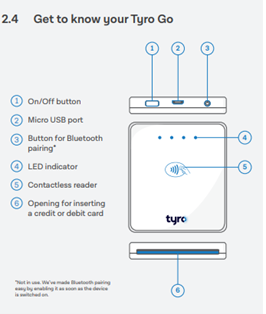
Switch on your Tyro Go reader using the On/Off Button (1), keeping it close to your smart device.
On your smart device, access settings and enable all of the following:
Log into the Tyro Go App using your credentials (see previous step).
Press the Reader icon at the top right corner of the Tyro Go App.

Select Connect reader and pair by:
Note: for a stable connection between the two devices we recommend they are kept within 10 metres of each other.
You should see a message Reader is connected when successfully paired.
To pair a new smart device to your Tyro Go, repeat the steps above.
Please note: only one smart device can pair with the reader at a time.
Australian-based 24/7 support

Complete in under 2mins
For us to find the best solution for you, please answer a few quick questions, and have the following details handy:


 Get the help you need